PowerShell.tiPS










tiPS PowerShell Module
PowerShell tips delivered straight to your terminal 💻.
86 PowerShell tips currently available!
💬 Description
tiPS is a cross-platform PowerShell module that provides PowerShell tips for things like:
- PowerShell features and best practices
- Helpful and cool PowerShell modules
- Terminal keyboard shortcuts
- Editor extensions to help with PowerShell development
- PowerShell communities and events
tiPS provides a low-effort way to learn new things about PowerShell, and help you become a better PowerShell user.
tiPS is community driven. Have a tip, module, blog post, or community event that you think others may find valuable? See the Contributing section below for how to easily add your own tips to tiPS.
If you enjoy this module, consider giving it a GitHub star ⭐ to show your support.
❓ Why this exists
There are tons of great tips and tricks for PowerShell scattered around on the internet, but they require you to actively go look for them. This module brings tips to you with minimal effort required on your part.
You can configure tiPS to show a tip every time you open your PowerShell terminal, or show a tip on demand by running the tips command.
🖼️ Screenshots
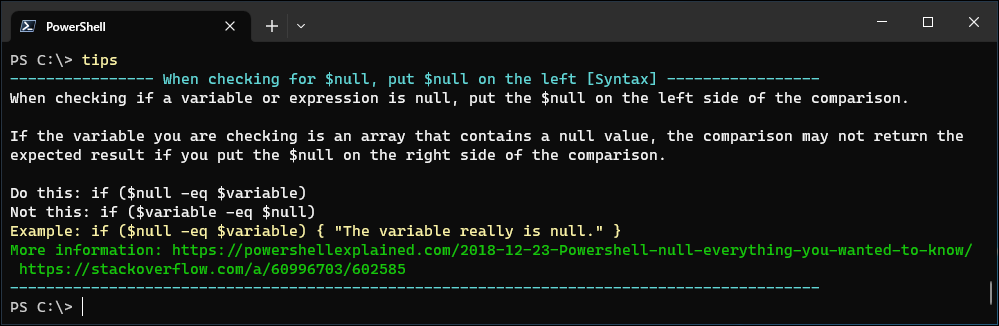
Calling the tips command to show a tip in the terminal:
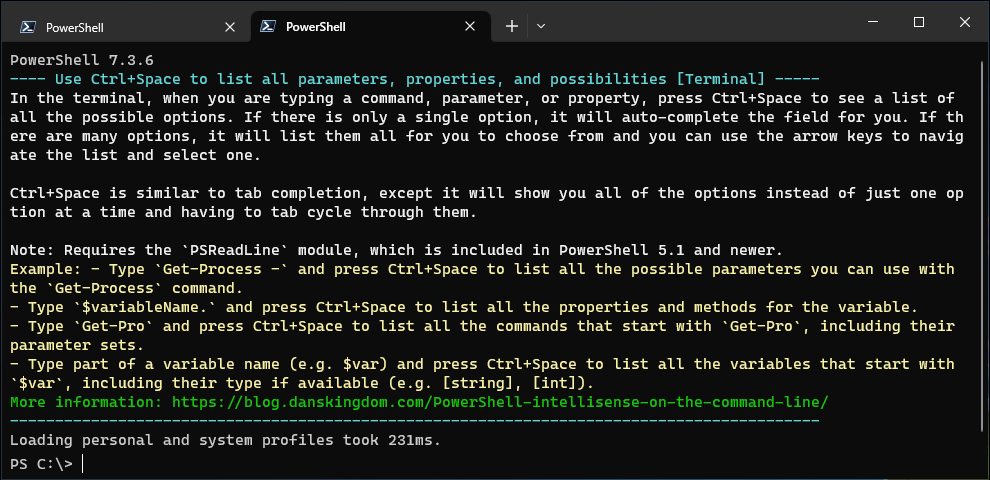
tiPS automatically showing a tip when PowerShell is opened:
🚀 Quick start
Paste the following commands into your PowerShell terminal to install tiPS and have it automatically show you a new tip every day:
Install-Module -Name tiPS -Scope CurrentUser
Add-TiPSImportToPowerShellProfile
Set-TiPSConfiguration -AutomaticallyWritePowerShellTip Daily -AutomaticallyUpdateModule Weekly
That’s it!
Use the tips command to show a tip in the terminal, or just wait for tiPS to automatically show you a new tip every day.
The above commands are explained in more detail below.
💿 Installation
The tiPS PowerShell module can be downloaded from the PowerShell Gallery and installed by running the following command in PowerShell:
Install-Module -Name tiPS -Scope CurrentUser
To show tips automatically, tiPS must be imported when the PowerShell session starts.
To have this happen automatically you can manually add Import-Module -Name tiPS to your PowerShell profile, or simply run the following command to do it for you:
Add-TiPSImportToPowerShellProfile
You can remove the import statement from your PowerShell profile by running the
Remove-TiPSImportFromPowerShellProfilecommand.
⚙️ Recommended configuration
The following configuration is a good balance for displaying new tips automatically and not being overwhelmed by them.
Set-TiPSConfiguration -AutomaticallyWritePowerShellTip Daily -AutomaticallyUpdateModule Weekly
By default tiPS does not automatically show tips or update itself, so you must configure it to do so by running the above command.
🔧 Commands
To see the full list of commands, use Get-Command -Module tiPS.
You can then use Get-Help <command> to get more information about a specific command.
Below are the popular operations.
📰 Show a tip
To show a nicely formatted tip in the terminal use:
Write-PowerShellTip
or its alias:
tips
💁♂️ Get a tip
To get a tip as an object that can be saved in a variable or piped to other commands, use:
Get-PowerShellTip
🤖 Automatic tip on PowerShell startup
To have a tip automatically displayed every time you open your PowerShell terminal, run:
Set-TiPSConfiguration -AutomaticallyWritePowerShellTip EverySession
Possible values for the -AutomaticallyWritePowerShellTip parameter are Never (default), EverySession, Daily, Weekly, Biweekly, and Monthly.
Tips will only be automatically shown in interactive PowerShell sessions. This prevents them from appearing unexpectedly when running scripts or other automated processes.
⬆️ Automatic updates
New tips are obtained by updating the tiPS module. Instead of remembering to manually update the module, you can have the module automatically update itself by running:
Set-TiPSConfiguration -AutomaticallyUpdateModule Weekly
Possible values for the -AutomaticallyUpdateModule parameter are Never (default), Daily, Weekly, Biweekly, and Monthly.
Automatic updates are performed in a background job, so they will not block your PowerShell session from starting. The updated module will be loaded the next time you open a PowerShell terminal or import tiPS. Old versions of the module are automatically deleted after a successful update.
🔀 Tip retrieval order
By default, the most recent tips are shown first. This means that if a new tip is submitted, it will be shown next. You can change the order in which tips are retrieved by running:
Set-TiPSConfiguration -TipRetrievalOrder Random
Possible values for the -TipRetrievalOrder parameter are NewestFirst (default), OldestFirst, and Random.
❌ Uninstalling tiPS
If you imported tiPS into your PowerShell profile, the import statement will not be removed if you just uninstall the tiPS module. If you uninstall the module without removing the import statement, you will get an error message every time you open a PowerShell terminal saying that it cannot find the tiPS module.
If you added the import statement to your PowerShell profile using the Add-TiPSImportToPowerShellProfile, you can remove it with:
Remove-TiPSImportFromPowerShellProfile
If you manually added the import statement to your PowerShell profile, you may need to remove it manually. To see which PowerShell profile file and line is importing tiPS, if any, run the command:
Test-PowerShellProfileImportsTiPS -Verbose
NOTE: This only looks for the import statement directly in your PowerShell profile files, not any other files that are dot-sourced from your profile.
📁 Get directory where user configuration is stored
To get the directory where the tiPS configuration and other related data is stored, run:
Get-TiPSDataDirectoryPath
To restore tiPS to the default configuration, simply delete the directory. If tiPS is uninstalled, the directory is not automatically deleted; it must be done manually. The directory is very small though, so it is not a big deal if it is left behind.
➕ Contribute a tip
tiPS is open source, and contributions are not only welcome, they are encouraged! 😀
Have a PowerShell tip you want to share? Know of a great module, blog post, or community event that you think others should know about?
There are 2 ways to submit your tip to tiPS:
- Use the GitHub issue template to create a PR for your new tip. This is the easiest way to submit a tip.
-
Fork the repo and create a PR for your tip the traditional way. You will need to fork the repo if you want to contribute other changes to the module, besides just new tips.
Follow the steps below to fork the repo and manually submit your PR:
- Fork this repo to your account (See GitHub docs).
- Clone the repo to your local machine, or open it in GitHub Codespaces, and create a new branch.
- Run the New-PowerShellTip script to create your new tip file in the PowerShellTips directory.
- Modify it with your tip info and commit your changes.
- Submit a pull request from your fork back to this repo (See GitHub docs).
🎦 This video walks through the above steps, showing how to fork the repo to contribute a new tip 🎦
tiPS is meant to be a community driven project, so please help make it better by contributing your tips.
Issues, Discussions, and Pull Requests are welcome. See the Contributing page for more details.
👥 Contributors
Thanks to these wonderful people who have contributed to tiPS:



🛣️ Roadmap
Below is a short list of planned enhancements for tiPS:
- A way to customize the look of the tip when it is displayed. e.g. add a border around it, change the colors, etc.
- Add a
Write-PowerShellTip -Previousswitch to output the last shown tip.
Have other ideas? Create a feature request issue
📃 Changelog
See what’s changed in the module over time by viewing the changelog.
❤️ Donate to support this project
Buy me a bagel for providing this module open source and for free 🙂
